掌上百科 - PDAWIKI

 找回密码
 免费注册

QQ登录

只需一步,快速开始

查看: 35192|回复: 53

[教程] MAC OSX词典转换笔记

[复制链接]

该用户从未签到

发表于 2014-8-29 22:28:32 | 显示全部楼层 |阅读模式
本帖最后由 qunwang6 于 2017-6-9 00:23 编辑
+ J! Y0 W' W5 I5 c% B! Z+ A
- K5 E; Z6 @6 @" j* y7 X. f
\BGL\DSL\MDX\CD\ ===> OSX.dictionary
5 ]/ t0 ?% |; r开源项目:PYGLOSSARY7 U: M* C/ @  A2 E" r
https://github.com/ilius/pyglossary
; g6 v+ j7 y& k
20170609更新:
2 O6 R1 f0 v* R) o' Y新版pyglossary 要安装以下环境:sudo pip3 install lxml beautifulsoup4 html5lib
6 [; ]0 {. L) m  H) hPython 改成Python3
2 K% p& `% y+ `4 ?, F8 M( D& P* i
✍
准备好以下环境:# H6 K* _7 N  T! D
* BeautifulSoup4 required to sanitize html contents.7 W8 T  {( d4 \7 v; e
sudo easy_install beautifulsoup4 html5lib
8 W4 f2 D0 _# }$ G/ G* GNU make as part of Command Line Tools for Xcode.$ y" b8 ]7 t$ O4 r, T. d8 C# L
http://developer.apple.com/downloads
5 [; C1 O' ?# m( p. \3 {# p3 C: d* Dictionary Development Kit as part of Auxillary Tools for Xcode + r; L  |+ S" S' K# @
http://developer.apple.com/downloads.
% T+ f* X% S& g; T将Dictionary Development Kit解压到/Applications/Utilities/DictionaryDevelopmentKit/
: v8 S9 v# Z. [5 R& J' Z(不含空格,中文名:应用程序/实用工具那里,也可以解压到其它地方。)

5 q& K, H" B# h* z" k0 C
+ B$ D: j( N; S5 w+ ~5 L
0 P5 j% t: \; {6 l/ F0 G8 |  A
BGL ===> OSX.dictionary
6 h7 {) D% X8 k" T' v转换
  1. python pyglossary.pyw --read-options=resPath=OtherResources --write-format=AppleDict dict.bgl dict.xml
复制代码
编译
0 H/ Y5 f" _" h; O6 ~  \5 z* 修改Makefile里2个参数,DICT_NAME是生成文件的名称,DICT_BUILD_TOOL_DIR是Dictionary Development Kit的路径,如果错了就不能生成文件。
( O( O& K0 H% Y8 a6 z* 修改Info.plist里3个参数,CFBundleName是在Mac字典程序工具栏下面显示的标签名,CFBundleDisplayName是词典名称,CFBundleIdentifier是词典的ID,需保持唯一性。。
9 H" y( r/ Y1 s' ]4 k* 根据模板格式编辑Dictionary.xml、Dictionary.css,如果有图片则放置在OtherResources/目录下.3 P8 Z' F5 K9 y/ s) Z+ H* n8 R
* 打开终端,cd进入模板文件目录,输入make,稍等一段时间,即可生成字典文件,将object目录下生成的dictionary文件拷贝至 ~/Library/Dictionaries,打开字典程序,即可看到生成的字典。
# l6 V# b9 l2 m  W6 `或者直接用make && make install这个命令,生成词典后直接安装到了~/Library/Dictionaries。
: q% O# t/ r. w" j2 ?- x! C5 r
- A. ~+ e" ?$ |( h! o**注意:如果OtherResources里的图片太多的话会出现以下错误:**2 g( x5 R' v8 W) e; ^8 Z
/Volumes/Macintosh HD/Applications/Utilities/DictionaryDevelopmentKit//bin/build_dict.sh: line 206: /bin/cp: Argument list too long
  {2 w; U/ H- w, B/ i4 R/ a) W' fError.
: H9 {" z! _; y" g. tmake: *** [all] Error 1

4 c  K1 v9 }7 U# I7 O% W. L
+ Q% K' r# j. V可以在编译前不加入图片、语音文件,在编译完成后将图片、语音文件复制到xxx.dictionary/Contents目录下。! i6 e3 T, J% X4 J

3 D5 B! B+ }$ z) h% _4 Z
& M7 U  @/ Z( h2 U% v" [9 ~

/ L/ Y; n- `: @  vDSL ===> OSX.dictionary4 X5 b/ D  Q3 p' `$ j6 e

: e2 F$ @/ ^. L  \$ v8 f1. Convert DSL from UTF-16 to UTF-8:
  1. iconv -f UTF-16 -t UTF-8 dict_utf16.dsl > dict_utf8.dsl
复制代码

, c* k2 a4 I# L0 U' M9 G+ k( s+ D; z2. Using pyGlossary python project, convert UTF-8 DSL to AppleDict XML:
  1. python pyglossary.pyw --read-format=ABBYYLingvoDSL --write-format=AppleDict dict_utf8.dsl dict.xml
复制代码
; z+ e8 ^' n1 I( }) p9 ]& d8 q/ x
**lingvo格式.dsl转换成可发音的词典。(注意修改命令参数)**↓: b0 z+ P, F3 |) W0 n8 L, X* @: b. |
audio conversion is optional, "no" by default. The following command works,, Y2 h4 U! K9 T
~/Development/pyglossary/pyglossary.pyw --read-option="audio=yes" test.dsl test.xml5 _: }- `7 c+ |+ D0 ]+ \; ?& |1 I
make && make install
  1. python /Applications/Utilities/DictionaryDevelopmentKit/pyglossary/pyglossary.pyw --read-options="audio=yes" --write-format=AppleDict ldoce55.dsl ldoce55.xml
复制代码

3 d2 M: e) {' u' C* c! y% q  B0 P3. Using Command Line Tools for Xcode and Dictionary Development Kit:编译步骤同BGL ===> OSX.dictionary
! q8 l) i( ?* \4 V+ P4 F( r
  1. make
    6 z) J6 H1 K5 P
  2. make install
复制代码
. c- b6 W( H0 o: g) V


  }+ l+ p% _' z- F: ^MDX ===> OSX.dictionary
7 T! o1 C" `! D+ e) j; Q3 ~, V* k# G$ L8 T: P$ }: k% y& H. z& Z
转换
5 q, v+ E. |' d+ E
  1. cd ~/Downloads/oald8/$ @6 q3 u) u9 w) o' @3 Y
  2. ~/Software/pyglossary/pyglossary.pyw --read-options=resPath=OtherResources --write-format=AppleDict oald8.mdx oald8.xml
复制代码

& i! P( V! g5 x# c0 y8 Z! Z' C# o修改.xml文件里的链接(如果不是可发音的词典,以下两步可略过)' N5 w( d. U3 b/ C) y
  1. sed -i "" 's:src="/:src=":g' oald8.xml( J. h! u, D0 j2 o. C+ U. A; |* v
  2. sed -i "" 's|sound://\([/_a-zA-Z0-9]*\).spx|\1.wav|g' oald8.xml
复制代码
第一个是去掉"/"
# @$ Z. b) j5 c  [6 u第二个是去掉”sound://" ,".spx"改成".wav"  o* r; l5 B/ v4 i( S
6 ]! s: i% E( L3 [9 @, A
将.spx语音文件转换成.wav(需要安装speex,麻烦!可直接从lingvo那里复制,或者直接从原光盘提取)
  1. find OtherResources -name "*.spx" -execdir sh -c 'spx={};speexdec $spx  ${spx%.*}.wav' \
复制代码

7 I+ O( d% H8 x; f编译步骤同BGL ===> OSX.dictionary
. f& H, r& d1 |3 y
  1. make && make install
复制代码
注意:如果OtherResources里的图片和语音文件太多的话会出现错误,可以在编译前不加入图片和语音文件,在编译完成后将图片复制到xxx.dictionary/Contents目录下。
' ~) E! N1 W$ T" V& h, ^8 \

) Z/ I2 t: T4 W; U' JCD(原词典光盘)===> OSX.dictionary
# ]5 Z0 N3 @" W+ E以OALECD8为例。  q( e1 c9 c0 n6 K  U
数据提取:虚拟机xp+python2.7,用IDMSKconv提取。
& a3 ~, v( q$ ]) X# y制作:从OALECD8安装目录下找到oalecd_master.css.BAK、从提取出的数据里找到output文件、以及图片和语音mp3文件,复制到Mac OSX下备用。  u$ I' v! l1 S1 Y
将output文件重命名为oalecd8.xml,oalecd_master.css.BAK作为CSS文件重命名为oalecd8.css,从Dictionary Development Kit里找到模板文件分别复制出MyInfo.plist、makefile文件,MyInfo.plist重命名为oalecd8.plist,修改oalecd8.plist和makefile里的参数。
3 K: m+ J) @0 V0 j排版:里面各种奇形怪状的标签可以不必修改,有oalecd_master.css.BAK作为默认CSS,所以只需要在oalecd8.xml里添加头部和尾部,删除不要的东西,就可以编译出和原版相同的词典。
" r0 L8 r& Z2 X; Z! d  Q......5 L# M1 ~! {: ?- d' g! g

) N# O! e7 ?( o7 e- b) S
###参考:5 A$ ]# g7 w6 r& P: ?
* GoldenDict Mac OS X available - Early Access Builds
2 X& m2 F. _* u& C+ L* PyGlossary Overview
& q# |6 {  U6 N3 A1 @5 k. ^*https://developer.apple.com/libr ... /doc/uid/TP40006152
! o( X- c; n+ M* G( \! D+ h( o8 m$ e- T
细节部分8 a' p( o( v  b" [# u6 K6 P
$ e7 w# E4 o! V8 d# b. ~
v======* 注意修改单词内部的链接========v
- l6 [2 U. `/ |单词跳转用x-dictionary:r:( M9 a- \) n; i, N% K, w+ Q0 y5 Q. M7 }
(只能在当前词典内跳转且x-dictionary:r:后的单词大小写须与d:entry id="***"里的大小写一致,不能有空格否则不能跳转。)
) E! M. c& r9 c6 c3 o
3 Z. v' }! i9 {& o  F3 n1 ~单词查找用x-dictionary:d:( j! Q4 Y4 J3 H2 A
(会先搜索当前的词典,若没有,会调用其它词典搜索,不限大小写、空格。)) P% u) ]* h. c4 m" o
(基本上都是用r,用d很少)/ Q! _( J) e: y* Z. D" s
^==============================^
+ a3 J# k4 k0 Y- p
The x-dictionary: URI contains three elements separated by colons as the general form—target selector, target text, and dictionary bundle ID. The target selector must be either d (for definition) or r (for reference). Use d if you want to search definitions of the following key text. Use r if you want to refer to the entry specified by the reference ID which must be unique to each dictionary.
辞書.appの辞書を引くURLスキームに
/ d( z! d6 J7 N次のようなものもあります。3 V/ W; P5 |! r8 L( p5 M
x-dictionary:d:key_text:dict_bundle_id
4 x7 B2 b" g: F9 {1 |2 Px-dictionary:r:reference_id:dict_bundle_id
% `# U- |" c5 F4 t( d& j' n**1key_text    調べたい単語
6 f- n* `, h4 V6 j1 R7 B7 _**2reference_id 辞書を作るために作成するdictionary.xmlの' h, F' j" W8 `+ G) ]' L) E
各タイトルごとに割り当てる固有のエントリーID$ M# r( ^/ ?% T7 U7 u1 P
<d:entry id="0ABCDE" d:title="案の定">

  d. [, G; p- h* ex.+ ~0 p# C: F+ c8 C9 j! `$ {

! g' X6 [4 X& G$ n- O

! r* k: F  W- B2 T9 w     <d:entry id="make a face" d:title="make a face">
: o8 K: N2 p& a     <d:index d:value="make a face"/>0 l) L5 ~- ]' H. N5 N. w# K
     <html><body><h1>make a face</h1>: z4 U# w' ^/ v! r
     <a href="entry://grimace">grimace</a></body></html>) x6 `0 g5 F7 Q5 _$ z# G
     </d:entry>; z; U9 Y6 i5 @5 C  x

+ {+ h5 f0 X2 R+ J+ W     <d:entry id="make faces" d:title="make faces">" e/ M( V3 L1 o. b  a; t
     <d:index d:value="make faces"/>1 {8 C5 S8 X! r  d' ?# q
     <html><body><h1>make faces</h1>
7 e/ @2 N' |" j) r3 e/ U. ^; {     <a href="entry://make a face">make a face</a></body></html& P; E/ c' z* F$ m. [5 U
     </d:entry>
, p3 P( G# Z/ i( [& `( a

2 D6 K  ~) Z) t& R"entry://grimace"
, o1 Q# p1 Q+ ~2 h' l6 z  R将entry://替换为x-dictionary:r:: H2 o, C8 P$ i
===>"x-dictionary:r:grimace"
3 x- W( i( L1 c( F; P

' @5 e* _( M; E) Md:entry id="make a face"
9 `1 ?& U1 ]9 N0 T: Q1 Dhref="entry://make a face"
% v1 }/ Q) L; Z0 n1 `; K, ^% c* Z& e
类似上面的单词,中间不能有空格,否则单词间不能跳转。9 n' F5 N- }: q
===>- I# _6 z9 u) r+ I
d:entry id="make_a_face"! K+ ]3 H8 V$ M6 t- _7 J
href="x-dictionary:r:make_a_face"
. m* P5 O! c& ~4 C3 M4 f替换空格需要用到的正则表达式:9 [* J' Q+ ?4 Z0 x
(在此感谢ryuya,https://pdawiki.com/forum/thread-13044-1-1.html)
  1. (<d:entry id="[^"]+)\s替换为\1_
复制代码
  1. (href="x-dictionary:r:[^"]+)\s替换为\1_
复制代码

  Y( `# n, p% @$ D  \& g: vv=========词组/词性跳转、定位===========v( ]. ~+ V. z( w: r
词组/词性页面内定位7 O7 ~9 b7 N- j- Y( E/ _! P3 e, A+ u
<a class="LP_OS" href="entry://#L_hkx1">suffix</a>
! y5 m. ?( m* c/ K! a7 J7 m) m<a name="L_hkx1"></a>9 B+ X8 o; z. q2 S
==> <a class="LP_OS" href="#L_hkx1">suffix</a>
9 L. q$ P  j+ [( L# t! D/ ^1 i------------------  U7 J9 F6 B  L) ~5 M
词组/词性跳转并定位
& T+ v' N/ g& S% e3 p<a href="entry://clip#ld3097">clip</a>
( l( Q6 u8 p6 h  N  ~<a name="ld3097"></a><span class="L_IDOM">$100 / 50 cents etc a clip</span>; J; @2 B& s. b6 s. K+ \* ^+ c
==> <a href="x-dictionary:r:clip:#ld3097">clip</a>
" P* F# G8 g6 z4 }( F1 x- ^1 s# h5 T用到的正则表达式:) V2 \+ P# o/ b
x-dictionary:r:(.+?)#
. R' q* E7 F3 `" ?& S替换为:
: |( X! \  W9 k  Ix-dictionary:r:\1:#
. r5 R, L  S, @  \. Z8 G! f相关的词典:朗文当代英语词典英汉双解第4版
+ }6 F) I* \: S1 q* TShorter Oxford English Dictionary Sixth Edition4 F: {5 w& j- u; T
^=========词组/词性跳转、定位===========^9 g8 i, [4 c: t  |, h3 p' Q


2 ^# j3 {! `( i1 J* @
& d3 M* B0 I4 ~: G1 ?另外一个开源项目8 W9 }' n8 c/ B$ e! G
DSL to OS X/iOS dictionary converter(相关教程可到我的空间相册里查看)5 Y0 R& ^/ N# a  Z8 a" y
https://github.com/svintuss/DSLConverter
* D8 t4 m2 g3 m# N) Q' n; J StarDict转换工具% n: C/ B' P, w3 h6 }- P; O7 b
https://code.google.com/p/mac-dictionary-kit/
8 g9 r; K2 d, [  @& u3 `( E' h8 s关于金山字体问题
6 ]4 E7 l% G! `http://www.linuxsir.org/bbs/thread363915.html. @5 _6 w7 A2 X
许多Linux词典也使用了Kingsoft Phonetic Plain字体,但是能下载到的金山字体一般都不是unicode编码的,导致Linux下音标显示为方框。实际上用FontForge修改一下金山字体即可使用。
. R, N: G' K: ]# Q0 |* `; |安装FontForge:% ]# I* i4 c6 p* g3 T/ J
#urpmi fontforge
8 W! ~2 T6 \( f( c, Y, j然后用FontForge打开金山字体文件,你可以看到FontForge对字体里的每一个字形都分两行显示。上面小的是字符的名称,下面大的就是那个字符的字形了。金山字体本来是对普通拉丁字符赋予音标字形的一个字体,但是因为它不是unicode编码,在Unicode的拉丁字符区一个字形都没有。
" n4 X; p5 F2 q所以首先要找到金山字符的位置,比较靠后。注意从一个空格字形开始的。这个空格很重要,因为空格和之后几个符号的字形跟普通拉丁字符的字形没有区别,所以我们用来定位所有的金山字符。7 I, {# `, [" r/ D
找到之后,从空格开始选定所有的字符,大约有三四十个。剪切之。6 J# T7 s4 O1 k! E8 a" R
然后找到拉丁字符区。可以看到所有的字形都是“X”,也就是空。找到表示空格的那个字符位(U+0020),选中,复制。所有的金山字形就按照顺序复制到这个字符位以及之后的字符位去了。% g( O2 |7 y  G) |6 k
最后保存成.ttf文件就OK了。保存的时候会有一些提示信息,照着做一下就行。# o) {/ K' H' I. w
顺便发一个做好的.ttf文件。仅为技术探讨,版权归原作者所有。

- \, ]. N3 j. y$ Z8 R9 V9 C+ W$ J8 p/ h- h6 c% ^; F( v


" E# E% L  f6 r0 j& \& I1 |一些小技巧
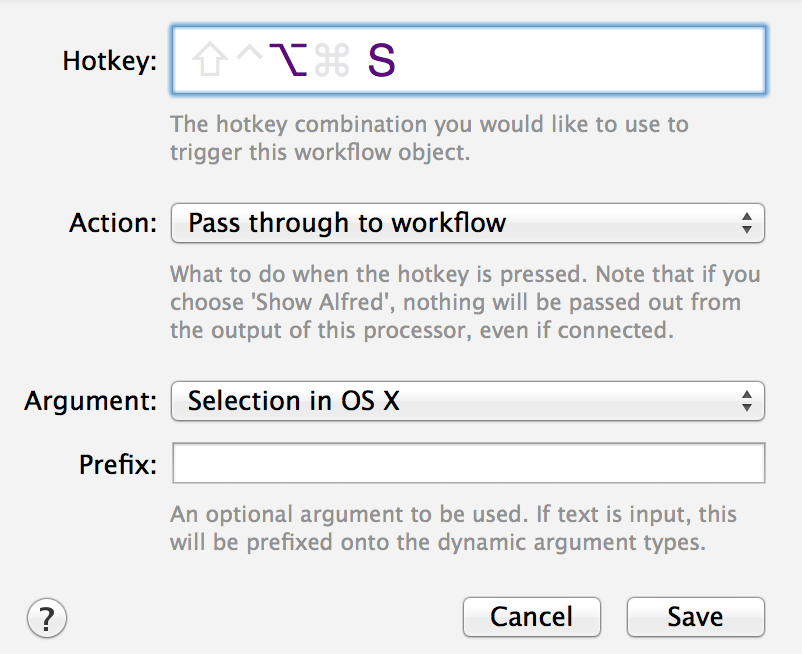
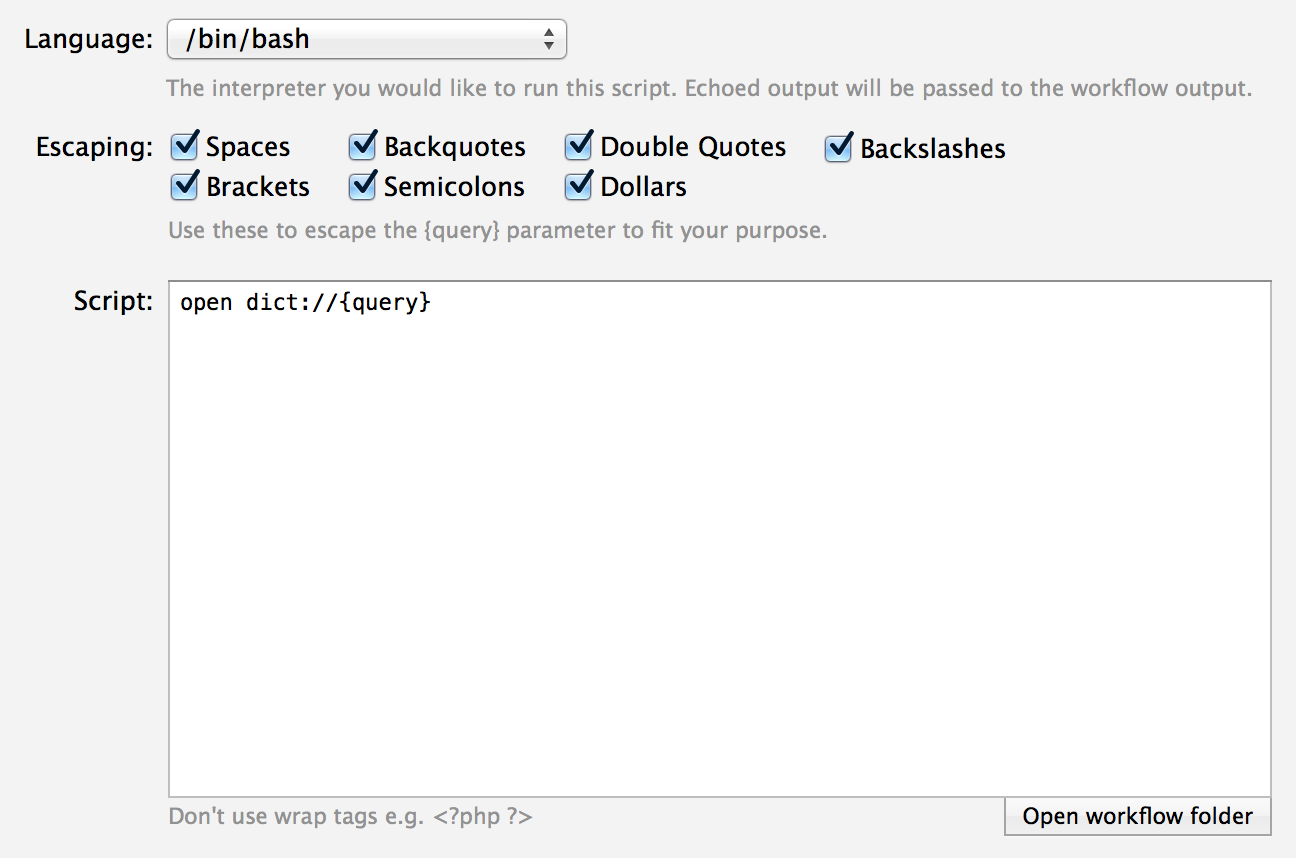
  S$ D/ c- p0 F5 L& lMac osx 下可以用三指取词,但在一些第三方软件下是不起作用的。& O, l/ h1 h$ n8 M- @) {) i) n
不过结合Alfred这个神器+下面这个脚本可实现热键取词。
  1. open dict://{query}
复制代码
同理可将网上流传的“142000个单词语音库”解压到同一个文件夹内,借助内置的afplay命令+Alfred+下面的脚本,可做到热键取词发音。
  1. afplay /Users/qunwang6/Sound/Webster/{query}.wav
复制代码

( W( y4 g" {, @% l  s2 F生词本! L' j0 E2 d" r( N  x1 B2 ^- X
BetterDictionary
  k* U/ V0 p, w8 X% f
0 y0 b8 G7 I. p4 o. p...

7 q$ _7 C1 m) H/ w" x
+ x9 J  L. p" h7 Z2 E; \
自己动手,丰衣足食。先发颗种子。
" f; t2 C  d' |! Z" X
Longman Dictionary of Contemporary English 5th Edition 无发音( R( F! @5 B0 K7 G2 y
(宇宙盘0x0001词库分类 /MAC OSX dictionary下 or http://pan.baidu.com/s/1kTolbkb)1 q( P- @, [, x0 b8 l/ `
转自https://www.pdawiki.com/forum/thread-10697-1-1.html

; d/ `& V1 U) v1 _6 F3 S: Z2 Z* Y1 }6 j
. M' M8 ?: a- F5 C4 Z/ E! R0 k 链接: http://pan.baidu.com/s/1i3rgl7n 密码: vcpf
! {( J  A% U9 \5 S+ H

本帖子中包含更多资源

您需要 登录 才可以下载或查看,没有账号?免费注册

x

评分

1

查看全部评分

本帖被以下淘专辑推荐:

该用户从未签到

发表于 2017-9-7 13:15:08 | 显示全部楼层
本帖最后由 colin00 于 2017-9-7 13:19 编辑 / s' V. H7 P- W, s% s. b

) d4 G" L4 }" J大神,我在转这部Collins的时候出现了问题:6 S) p+ y% m: l- Q
, W6 h; R* ^4 _* K+ ?) f1 M/ M
  1. """/Developer/Extras/Dictionary Development Kit"/bin"/build_dict.sh"  "CollinsDictionary" "CollinsDictionary.xml" "CollinsDictionary.css" "CollinsDictionary.plist"8 C! [, o" n1 f9 v/ O. O. q
  2. - Building CollinsDictionary.dictionary.* E! c  c3 F3 |9 K5 t
  3. - Checking source.' e7 t$ O9 I' _
  4. CollinsDictionary.xml:70: parser error : xmlParseEntityRef: no name
      c( e# t* _% A& H; y( g
  5. OL.css$/;for(var i=_l.length-1;i>=0;i--)with(_l.href){var _m=match(_r);if(_m&9 s  m$ J3 f# A
  6.                                                                             ^
    ) A4 o* D( t& s$ d+ C
  7. CollinsDictionary.xml : failed to parse. I2 h1 W( h# f0 \
  8. Error.
    3 L- X& V5 s/ F0 P
  9. make: *** [all] Error 1
复制代码
) n4 M  i6 c# A: Z* Q( B8 q

: y; l# m- u5 d请问下,这个该如何解决呢?
" u  D+ t. `5 E+ {4 ^1 h
8 d$ i: F% v$ `2 D* x谢谢!
$ l: M9 E% c  y7 E
; O1 ]& E/ C6 }9 \这一行代码是这样的:
! N' z2 D+ q4 s! j
  1. <d:entry id="_n" d:title="404">6 e$ V' A- x( Z5 V
  2. <d:index d:value="404" d:title="404"/><h1>404</h1><div class="dxr"><div id="404_1"><div class="j84"><a id="404_1"></a><div class="f9d">404 <span class="kf5">/&#716;f&#596;&#720;&#601;&#650;&#712;f&#596;&#720;<img class="ik4" onclick="aes(this,'e/en_/en_gb/en_gb_404')" src="sp.png"/>/</span></div><div class="mh1"><div class="x5z"><h3 class="jgs"><span class="sg0">noun</span></h3><div class="o8h"><div class="lij"><span class="rgm">slang.</span> <span class="sd9">a stupid or ineffectual person</span></div></div></div></div><div class="roj"><h2 class="fhq">Origin</h2>C21: from the Internet error message '404 Not Found'</div></div></div><script src="cl.js" type="text/javascript"></script><script>if(typeof(uc1)=="undefined"){var _l=document.getElementsByTagName("link");var _r=/COL.css$/;for(var i=_l.length-1;i>=0;i--)with(_l.href){var _m=match(_r);if(_m&&_l.id=="kc1"){document.write('<script src="'+replace(_r,"cl.js")+'"type="text/javascript"><\/script>');break;}}}</script></div>
    - r: T; u, u% m* z) P! r' ~
  3. </d:entry>
复制代码

该用户从未签到

 楼主| 发表于 2014-9-6 09:58:50 | 显示全部楼层
cidianaihao 发表于 2014-9-6 08:39 9 ?' G: E5 X5 O3 z' Y/ e
不过结合Alfred这个神器+下面这个脚本可实现热键取词。
# r% D/ E' V0 p( d- Y* `7 J8 b: n4 N5 ?- J
    open dict://{query}

. [  I4 |; {" v# g: ]/ l

该用户从未签到

发表于 2017-2-12 23:35:57 | 显示全部楼层
感谢楼主,成功转换了[英-汉] 牛氵聿高阝介第⑧中英又又解 https://www.pdawiki.com/forum/thread-14881-1-1.html。但是有几个问题:& S( D6 T9 ]- g0 X  }, n1 L1 {8 X
1.
2 z; g* ?# N! F+ G! t8 I2.
3 k6 W' F- H8 k" _2 S图片的xml代码如下:
3 T8 j; ^0 R, p4 F$ h9 ~$ d
  1. <img alt="/pic/fruit_comp.jpg" height="540" onclick="this.style.display='none';this.nextSibling.nextSibling.style.display='block';" src="/pic/fruit_comp.jpg" style="display:none;" width="720"/>) h4 ^6 j' \  L
  2. <img alt="/thumb/apple.jpg" backup-height="540" backup-width="720" class="Media" onclick="this.style.display='none';this.previousSibling.previousSibling.style.display='block';" resource="pic" src="/thumb/apple.jpg" thumb="apple.jpg" thumb_resource="thumb" topic="fruit_comp.htm" type="image"/>$ H" |+ Y. r' Y! n. D9 V
复制代码
4 a8 k3 B3 f1 q8 m# I
文件O8C.dictionary/Contents/pic/fruit_comp.jpg也存在。这个词典里面的所有图片都没有。你发的朗文5里面图片是可以的
5 [( e1 s/ ]( R. v1 {6 W
( a0 {+ A. b" Q- r词性的xml代码如下:
  1. <span class="block-g" display="block" level="3">
    1 U" ~- ^# D$ f1 T/ ]
  2. <span class="pos-g" display="inline" level="4">2 y) V% W) k" W, R( |( Q
  3. <span class="pos" level="5" pos="n">noun</span>
    9 a  Q9 n% C# L3 p2 v! z3 O( `  m
  4. </span>( \9 K- Z/ `: a0 \& N) z% G+ x
  5. <img alt="/pic/fruit_comp.jpg" height="540" onclick="this.style.display='none';this.nextSibling.nextSibling.style.display='block';" src="/pic/fruit_comp.jpg" style="display:none;" width="720"/>5 z. B/ B5 a  {$ Z6 C
  6. <img alt="/thumb/apple.jpg" backup-height="540" backup-width="720" class="Media" onclick="this.style.display='none';this.previousSibling.previousSibling.style.display='block';" resource="pic" src="/thumb/apple.jpg" thumb="apple.jpg" thumb_resource="thumb" topic="fruit_comp.htm" type="image"/>
    + k+ h+ x. g8 E5 d# E
  7. <span class="clear"></span>8 p; Q2 \$ d5 C. O* ]
  8. </span>
复制代码
1 s% m9 d4 ]' u$ F8 W: o1 l% N
就只有第一行在音标后面的词性才不换行,之后的词性没有问题,所有的单词都是这样。当窗口宽最小时,词性才换行7 E; \% c3 a- X, M# L& |$ q3 e
! J- t9 z. U1 \$ F2 g
第一行的xml代码如下:1 Y" u2 w1 o) J6 x4 W! j& A; l- I% T2 [
  1. <span class="top-g" level="2">' W4 E+ o8 a0 A8 T4 m$ ^" C
  2. <span class="h" core="y" level="3">apple</span>
    / B9 U, r7 G* @- o( Z9 y
  3. <span class="z">% l$ C( _, V/ X
  4. <span class="symbols-coresym">★</span>
    0 B; V& Q; T5 X1 }1 [
  5. </span>
    8 [: e0 _& }8 H9 L% F! _% N' h
  6. <span class="ei-g" level="3" type="h_full_">
    ' V8 C2 a) [8 p( A! j
  7. <span class="z_ei-g">/</span>3 t7 o8 Z5 O0 Y7 `" U: f3 A; L7 u
  8. <span class="phon-gb" file="{gb}/a/ap/app/apple#_gb_1.spx" level="4" recdate="070503" wd="apple">&#712;&#230;pl</span>
    & x1 ?3 V1 f* y6 z
  9. <a backup-class="Media" class="fayin" href="x-dictionary:d:sound://uk/apple__gb_1.spx" resource="uk_pron" topic="a/app/apple/apple__gb_1.spx" type="sound"><img class="fayin" src="uk_pron.png"/></a>, c) a: F) J5 i- {$ `6 u& u
  10. <span class="z">;
    - J( k9 w6 k- c( I3 ?
  11. <span class="z_phon-us">NAmE</span>
    - d9 A2 m; H. K9 ^; o- {6 J
  12. </span>
    8 ~) G, U' w0 _0 R; C+ f
  13. <span class="phon-us" file="{gb}/a/ap/app/apple#_us_1.spx" level="4" recdate="070503" sup="y" wd="apple">&#712;&#230;pl</span>
    8 w8 U( ?0 I5 G6 a4 o* k- o
  14. <a backup-class="Media" class="fayin" href="x-dictionary:d:sound://us/apple__us_1.spx" resource="us_pron" topic="a/app/apple/apple__us_1.spx" type="sound"><img class="fayin" src="us_pron.png"/></a>
    ' V" B$ M. t& R+ m7 B$ ]
  15. <span class="z_ei-g">/</span>/ _) B9 T7 G* z! M
  16. </span>
    / H' Y( n, t/ s1 l2 a* s
  17. <span class="block-g" display="block" level="3">
    # Y+ R6 I# g5 Y2 ?/ |& B( s
  18. <span class="pos-g" display="inline" level="4">8 M2 S; R; r" L
  19. <span class="pos" level="5" pos="n">noun</span>% l3 k+ E4 g- w  S" k& W# Z
  20. </span>3 t7 a& d3 ~% O% J! ]
  21. <img alt="/pic/fruit_comp.jpg" height="540" onclick="this.style.display='none';this.nextSibling.nextSibling.style.display='block';" src="/pic/fruit_comp.jpg" style="display:none;" width="720"/>
    # _4 w& H& e% J$ Z7 C' T( ?
  22. <img alt="/thumb/apple.jpg" backup-height="540" backup-width="720" class="Media" onclick="this.style.display='none';this.previousSibling.previousSibling.style.display='block';" resource="pic" src="/thumb/apple.jpg" thumb="apple.jpg" thumb_resource="thumb" topic="fruit_comp.htm" type="image"/>
    6 h; Q- o! R, x5 m; s6 w
  23. <span class="clear"></span>
    : l, ]; l1 l0 x% u0 t; I
  24. </span>
    3 `2 F3 L9 p2 l
  25. </span>
复制代码
& ?' A! p: D/ o. T
( [) j9 e8 ]& N, n/ m8 _

本帖子中包含更多资源

您需要 登录 才可以下载或查看,没有账号?免费注册

x
  • TA的每日心情
    衰
    2021-9-20 08:09
  • 签到天数: 10 天

    [LV.3]偶尔看看II

    发表于 2021-8-25 03:52:19 | 显示全部楼层
    能出个视频就好了,我连用什么软件转换都不知道

    该用户从未签到

    发表于 2020-2-3 15:02:57 | 显示全部楼层
    Thanks for your great work.
  • TA的每日心情
    开心
    2022-4-14 08:13
  • 签到天数: 71 天

    [LV.6]常住居民II

    发表于 2019-8-17 13:05:34 | 显示全部楼层
    兄弟,LDOCE6好像用不了哦。
  • TA的每日心情
    无聊
    2019-6-22 20:04
  • 签到天数: 75 天

    [LV.6]常住居民II

    发表于 2017-12-25 15:53:29 | 显示全部楼层
    请问各位有没有 牛津高阶英汉双解第八版 给mac用的呢

    该用户从未签到

    发表于 2017-9-10 10:40:58 | 显示全部楼层
    qunwang6 发表于 2017-9-9 20:01
    , R" G' l7 T) _2 h6 N6 s4 p: \& ~$ P用ultraedit编辑器打开,正则替换

    3 J( m- ~( R  D8 I3 c- ~多谢大神,已经成功制作了!!!

    该用户从未签到

     楼主| 发表于 2017-9-9 20:01:31 | 显示全部楼层
    本帖最后由 qunwang6 于 2017-9-9 20:03 编辑 4 g# x, P" I+ W) U% S4 `# l
    colin00 发表于 2017-9-8 15:310 _4 c. {8 h9 h; t7 f- C1 d  ^
    谢谢大神,新版本貌似不能删除空格,删除了就没用了;xml文件很大,不知道为什么用编辑器打开存储后老出 ...
    % k1 q  i1 L. A3 s
    ! l1 z8 f. _' v- X8 x, h; ?
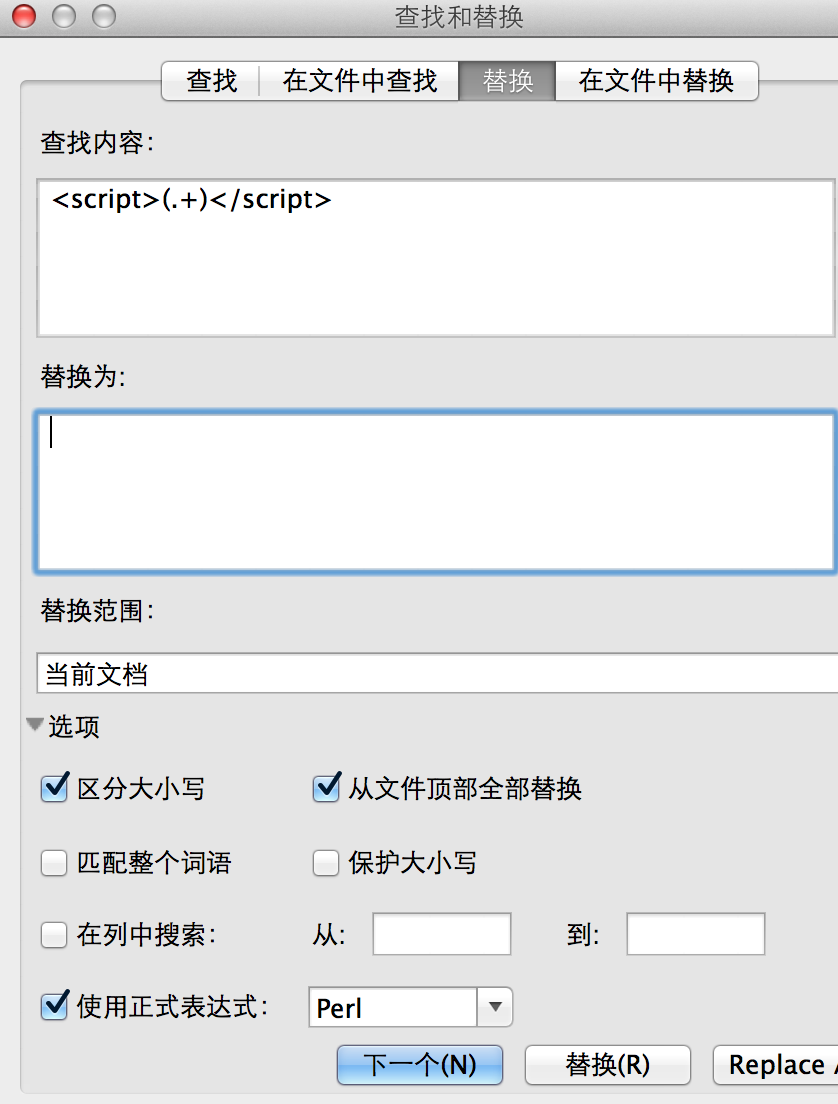
    用ultraedit编辑器打开,正则替换
    % ^9 q+ Y9 t* c

    该用户从未签到

    发表于 2017-9-8 15:31:58 | 显示全部楼层
    qunwang6 发表于 2017-9-7 23:11& Q* J( P, D  d. ?
    不支持javascript,把和里面的内容删掉,单独用一个单词测试编译试试。另外"/Developer/Extras/Diction ...

    5 W/ z! U& e/ Y5 \  ^) W; f' x谢谢大神,新版本貌似不能删除空格,删除了就没用了;xml文件很大,不知道为什么用编辑器打开存储后老出现 invalid string length 的错误,所以想借助终端的 sed 命令批量修改,但是又不知道该怎么删除这种 html 标签和中间内容,大神指教下吧~~

    该用户从未签到

     楼主| 发表于 2017-9-7 23:11:17 | 显示全部楼层
    本帖最后由 qunwang6 于 2017-9-7 23:12 编辑
    : @! I8 s# V8 Y5 g0 S; ?" _% F
    colin00 发表于 2017-9-7 13:15
    # C( Q" O& M4 P+ x! K大神,我在转这部Collins的时候出现了问题:

      H+ _+ `% P8 m/ U; w* S0 u  K. h% a: l+ w( ?
    不支持javascript,把<script></script>和里面的内容删掉,单独用一个单词测试编译试试。另外"/Developer/Extras/Dictionary Development Kit"/bin"/build_dict.sh"路径里有空格,建议去掉。

    该用户从未签到

    发表于 2017-2-26 22:07:37 | 显示全部楼层
    太好了支持一个一定要顶非常实用

    该用户从未签到

    发表于 2017-2-24 13:04:15 来自手机 | 显示全部楼层
    感谢大师的作品!
  • TA的每日心情
    开心
    2026-10-4 03:22
  • 签到天数: 814 天

    [LV.10]以坛为家III

    发表于 2017-2-22 07:17:52 | 显示全部楼层
    有没有OSX to MDX的方法

    该用户从未签到

    发表于 2016-12-16 18:11:38 | 显示全部楼层
    楼楼xcode8是不是不可以用啊?

    该用户从未签到

    发表于 2016-11-28 09:54:42 | 显示全部楼层
    micangel 发表于 2016-11-27 17:53: n- F  D; @" E/ B% n# L" J
    才看到大神的回复.已经转头的欧路Mac版的怀抱. 用Anki的Word Query插件可以实现制卡直接同时导入多本Mdx  ...

    & ?5 l* T+ Z3 f( s$ v5 b支持楼主!!!
  • TA的每日心情
    开心
    2023-2-17 00:10
  • 签到天数: 3 天

    [LV.2]偶尔看看I

    发表于 2016-11-27 17:53:17 | 显示全部楼层
    qunwang6 发表于 2016-10-30 22:15& x6 y" g/ f  C3 [% H" Z
    /Applications/Utilities/DictionaryDevelopmentKit//bin/build_dict.sh: No such file or directory
    7 Q. x: V' n5 C3 ]检 ...
    5 N3 ]' f# F2 j+ L5 n& O4 O9 v, U
    才看到大神的回复.已经转头的欧路Mac版的怀抱. 用Anki的Word Query插件可以实现制卡直接同时导入多本Mdx dict的释义,已经玩High了.这个错误还真没注意到,谢谢大神, 方法mark. 回头再试一遍,当是学习.

    该用户从未签到

     楼主| 发表于 2016-10-30 22:15:24 | 显示全部楼层
    micangel 发表于 2016-10-29 17:02
    8 ]; ^, ]7 B7 L; K! o) q"""/Applications/Utilities/DictionaryDevelopmentKit/"/bin"/build_dict.sh"  "abc" "abc.xml" "abc.css" ...

    4 x& E6 E% w. `6 q/ j8 D/Applications/Utilities/DictionaryDevelopmentKit//bin/build_dict.sh: No such file or directory
    ) j! w/ B0 e/ T8 h8 ]; d检测一下文件的路径. w) U6 z# `0 w2 P1 b
  • TA的每日心情
    开心
    2023-2-17 00:10
  • 签到天数: 3 天

    [LV.2]偶尔看看I

    发表于 2016-10-29 17:02:36 | 显示全部楼层
    """/Applications/Utilities/DictionaryDevelopmentKit/"/bin"/build_dict.sh"  "abc" "abc.xml" "abc.css" "abc.plist"
    0 G$ X4 P# D% B8 E/bin/sh: /Applications/Utilities/DictionaryDevelopmentKit//bin/build_dict.sh: No such file or directory& m8 v9 C! ]: |6 m  y
    make: *** [all] Error 127
    $ g# g  ]+ b; D& ]! ^/ B 到make这一步时出现这个问题,求大神现身.
    , ^/ E" N. J8 @3 M. Z5 {

    该用户从未签到

    发表于 2016-10-29 14:22:58 | 显示全部楼层
    谢谢楼主努力,提供好资源。

    该用户从未签到

    发表于 2016-8-21 22:26:55 | 显示全部楼层
    谢谢了,大神。
  • TA的每日心情
    擦汗
    2021-3-14 12:27
  • 签到天数: 1 天

    [LV.1]初来乍到

    发表于 2016-7-15 20:12:13 | 显示全部楼层
    支持一下开源项目
    您需要登录后才可以回帖 登录 | 免费注册

    本版积分规则

    小黑屋|手机版|Archiver|PDAWIKI |网站地图

    GMT+8, 2026-11-2 07:35 , Processed in 0.031169 second(s), 29 queries .

    Powered by Discuz! X3.4

    © 2001-2023 Discuz! Team.

    快速回复 返回顶部 返回列表